One item ID joins several different kinds of evidence
Choose a simple internal identifier such as CN-001. It belongs to your inventory, not the manufacturer or insurer. The item’s model describes a product type; the serial, when present, identifies the particular unit. A shop receipt can contain several products. None of those numbers should be copied into another field simply because a form needs a value.
NAIC consumer guidance recommends keeping brand, price, purchase date, model, serial, receipts and item photos in a home inventory. These records can help organize a claim discussion. The guidance does not establish that a particular insurer will accept your valuation or cover an item. Check your policy and ask the insurer about evidence requirements.
Photograph the item as it is, and take a readable label photo where safe access permits. Do not dismantle equipment, move unsafe loads or reveal private documents in the background to complete an inventory. If the serial cannot be read, write “unreadable” or “not found” and keep the photograph as limited evidence.
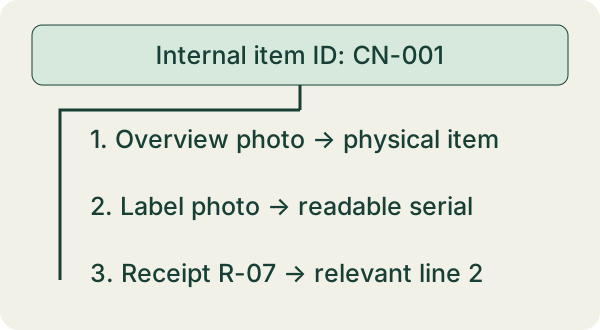
Worked bundle: one receipt, two similar devices
A fictional receipt R-07 lists two similar devices on separate lines. The owner has a photo for each, but only one readable serial label. A shared purchase date does not prove which serial belongs to which unit.
| Item ID | Photo / label | Receipt reference | What remains unresolved |
|---|---|---|---|
| CN-001 | overview-001; label-001 readable | R-07 line 2; description matches | Verify exact serial transcription |
| CN-002 | overview-002; label blurred | R-07 line 3; description matches | Serial unreadable; do not copy CN-001 serial |
| CN-003 | overview-003 only | Receipt not located | Purchase date and paid price not verified |
For CN-001, compare the text in your record directly with label-001. Preserve leading zeros and distinguish similar characters such as O/0 only when the image supports the distinction. For CN-002, a better label photo may resolve the gap; the sibling unit’s serial cannot fill it.
Keep one original receipt file with line references rather than making inconsistent copies for every item. A receipt line may itself cover a quantity of two, so record that limitation. If the documents do not distinguish the two units, say so. Do not invent a one-to-one association from a general description.
Test whether another person can follow the bundle
Open the item record and follow each reference. Can you find the physical-item photo, read the label, and locate the relevant receipt line? Record match status separately: verified, tentative, unreadable or missing. A filename is a pointer, not proof of ownership or condition.
Keep paid price, your replacement estimate and any insurer-agreed value in separate fields or notes. Date estimates and identify their source. A current advertised price is not automatically what you paid or what a policy will pay. If the item was a gift or second-hand purchase, preserve the evidence you actually have without manufacturing a store receipt.
Protect the bundle and retain usable backup copies through your chosen secure process. Do not publish serial numbers, addresses or receipts in a public spreadsheet. An export kept only on the same lost device is not a tested recovery plan. Confirm that your backup can actually be opened.
Use CoverNest to organize reviewed proof details
CoverNest’s current US listing includes a room-by-room catalog, serial numbers, photos, warranty notes, receipt scanning/extraction and insurance-report PDF export. Review AI-extracted item fields against the actual documents before relying on a report. A generated field is not a confirmed evidence match.
The worksheet here supplies an explicit item-to-file/receipt-line audit. It is not a claim that CoverNest automatically matches every label or maintains this exact bundle structure. The listing does not fully enumerate free and paid allowances; check installed features and current terms before depending on export.
Review CoverNest’s current processing privacy details before optional AI receipt text. The app is an organization tool, not insurance, legal, valuation or claims advice. Use the linked broader home-inventory checklist for room coverage after resolving the evidence behind each item.
If the method fits your task, explore CoverNest’s listed features on an iPhone. Check current features and plans before downloading.
See CoverNest for iOSDownload the free worksheet
Use the CSV in Numbers, Excel or a spreadsheet editor. Three fictional item bundles plus a blank row. Import IDs and serials as text; no fabricated serial, valuation or claim acceptance. Replace them with your own observations. The CSV is separate from the app and no email is required.
Questions answered
Is my item ID the same as its serial number?
No. The internal inventory ID joins your records; the manufacturer’s serial belongs to the physical unit when available.
Can one receipt support several item records?
Use the same receipt reference with its relevant lines or quantities. Do not invent a unit-level match the receipt cannot establish.
Will a completed bundle guarantee reimbursement?
No. Coverage, valuation and evidence acceptance depend on the policy and claim review.
Continue with CoverNest on iOS
Use the App Store listing to check compatibility, privacy information and current plan terms. A free download may offer paid features.
Download CoverNest for iOSSources and product details
- NAIC: understanding homeowners or renters policiesInventory fields and photos; checked October 15, 2026. No insurer acceptance or payout guarantee.
- CoverNest on the App StoreCurrent US App Store product description; checked October 15, 2026.
Editorial method: primary guidance, a current Apple listing, an original worked example and an independent critique. No search ranking, install or outcome result is claimed.